
Your first show
After this one-time set-up, every show is the same three moves: open the dashboard, click the icon, press Start relaying.
Before you start
Section titled “Before you start”- The app is running (its window is open, or its icon is in the tray on Windows or the menu bar on a Mac).
- The printer is picked and the test label printed.
- The extension is added and pinned.
Run the show
Section titled “Run the show”-
In Chrome, open your seller dashboard for the show. This is the page you run the show from.
-
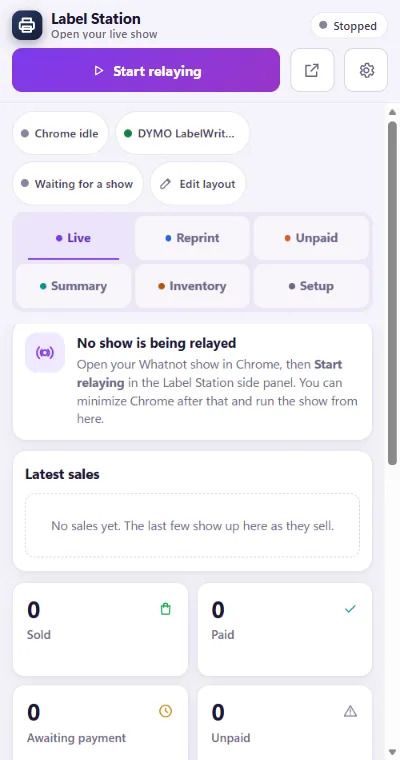
Click the Label Station icon beside the address bar. A panel opens on the right side of Chrome. The top of the panel is the relay control. Under it is the Label Station app, the same thing as the app window.
-
Click Start relaying. The pill at the top turns to Relaying and the app shows your show’s name.
-
Go live the way you always do. When an item sells, its label prints at the hammer and the sale appears under Latest sales and Sold.
-
You can minimise Chrome and run the show from the Label Station window if you prefer. Keep the dashboard tab open. The extension reads from it.
-
When the show ends, click Stop relaying in the panel. Click twice: the first click asks you to confirm.
You are set up when the Setup tab shows a green printer line, a test label printed, the Label Station icon sits beside Chrome’s address bar, and the panel’s pill reads Relaying on your show.
After the show, the Reprint tab has every sold item in case a label needs printing again, and Summary has the totals.
If something looks different
Section titled “If something looks different”- The panel says “Label Station isn’t running on this PC”. Start the app, then click Check again in the panel. Sales from while it was off are kept and print once it is back.
- The pill says “Chrome tab moved”. Your dashboard tab is on a different show. Click Relay this show to follow it.
- Relaying, but nothing prints. See Labels are not printing.
Where to next
Section titled “Where to next”Still stuck, or is something on this page wrong? Get in touch and Andy will sort it out. Label Station is made by Mood Swings Design. Not affiliated with or endorsed by Whatnot.