
The Live tab
The Live tab is the show as it happens. It is the first tab, and the same page appears in the side panel under the relay strip.
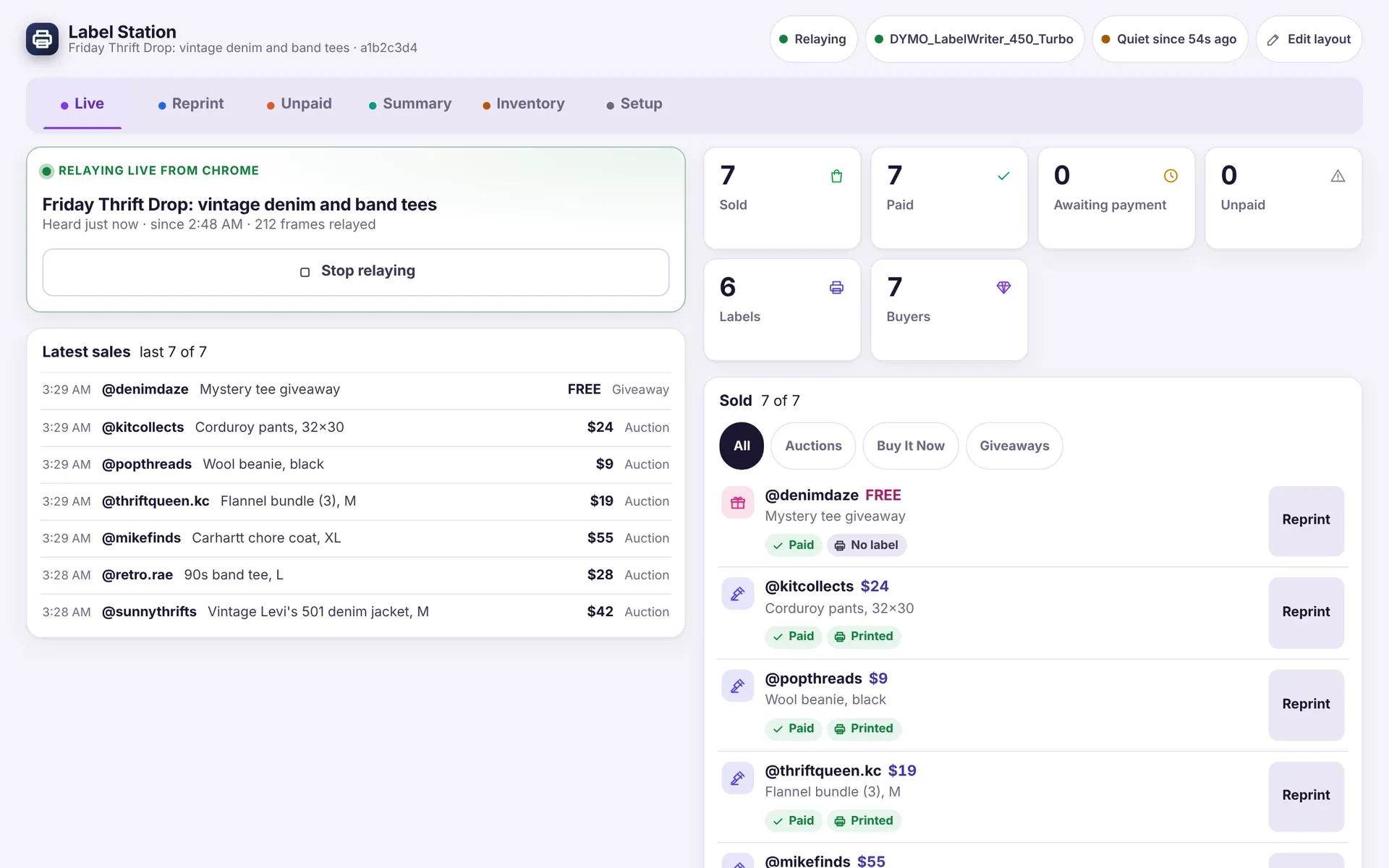
The top bar
Section titled “The top bar”Three pills sit at the top of the window.
- The first shows whether Chrome is relaying (Chrome idle until you start).
- The second shows your printer.
- The third shows whether sales are arriving: Waiting for a show, then Live with a count of frames heard, then Quiet since a time if nothing has arrived for a while.
If Chrome is not relaying, a banner says Waiting for Chrome and tells you to open the side panel on your show and start relaying.
The relay card
Section titled “The relay card”On the left, the relay card shows which show Chrome is relaying, how long ago it last heard from the tab, how many frames it has relayed and how many sales are waiting. Its buttons:
- Stop relaying ends the relay. It asks twice.
- Refresh the show tab reloads your dashboard tab when it has gone quiet.
- Relay this show follows the tab when it moved to another show.
Latest sales and totals
Section titled “Latest sales and totals”Latest sales lists the last few sales as one-liners: time, buyer, item, price and kind.
Six tiles give the totals:
| Tile | Meaning |
|---|---|
| Sold | Items that sold. |
| Paid | Items with a payment confirmed. |
| Awaiting payment | Closed, payment not yet confirmed, and still inside the time you set. |
| Unpaid | Closed with no payment confirmed within that time. |
| Labels | Labels printed. |
| Buyers | Different buyers so far. |
Sold lists each sale with its buyer, item, price, whether it is Paid, Awaiting payment or Unpaid, and whether its label Printed. Click the chips All, Auctions, Buy It Now or Giveaways to filter. Each row has a Reprint button. The list shows the latest 25. Click Show all to see the rest.
Boxes lists each buyer with their box number when box numbers are on.
If something looks different
Section titled “If something looks different”- Everything shows zero. No show is being relayed. Open the side panel and click Start relaying.
- A sale is missing. Check the pill at the top. If it says Quiet since, click Refresh the show tab.
- The tabs are in a different order from this page. You may have changed them with Edit layout. See Themes, text size and layout.
Where to next
Section titled “Where to next”Still stuck, or is something on this page wrong? Get in touch and Andy will sort it out. Label Station is made by Mood Swings Design. Not affiliated with or endorsed by Whatnot.