
Add the extension to Chrome
The extension is the half of Label Station that lives in Chrome. It reads your sales from your seller dashboard tab and passes them to the app. For now you add it by pointing Chrome at the extension folder in your kit. Chrome calls this loading an unpacked extension. It takes a few clicks.
Before you start
Section titled “Before you start”- The app is installed and you still have the kit folder (see Install on a Mac for the Mac).
- You do not move or delete the kit folder afterwards. Chrome reads the extension from it every time it starts.
Add it
Section titled “Add it”-
Open Google Chrome. Click in the address bar, type
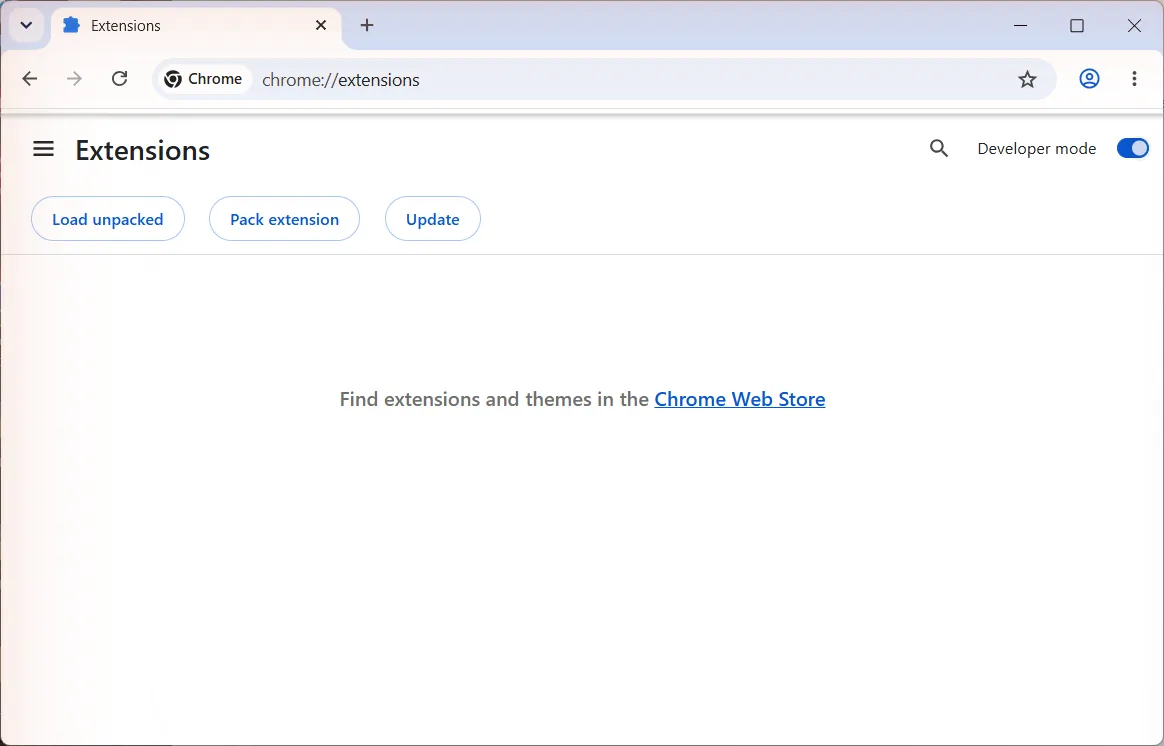
chrome://extensionsand press Enter (Return on a Mac). The Extensions page opens. -
Turn on the Developer mode switch at the top right. Three buttons appear under the heading.
-
Click Load unpacked. A window opens asking you to pick a folder.
-
Find your kit folder and open it. Click the extension folder once so it is highlighted, then click Select Folder. On a Mac the button says Select.
-
Label Station now shows as a card on the Extensions page with its switch on. You do not need to come back to this page.
-
Pin it so it is one click away. Click the puzzle piece icon at the right end of Chrome’s address bar, find Label Station in the list and click the pin next to it. The Label Station printer icon now sits beside the address bar.
If something looks different
Section titled “If something looks different”- Chrome says “Manifest file is missing or unreadable”. You picked the wrong folder. Click Load unpacked again and choose the folder named extension, not a file inside it.
- The Label Station card shows an error or is greyed out. The kit folder was moved or deleted. Put it back, or unzip the kit again, then click Reload on the card. You can also remove the card and load it again.
- Chrome asks “Disable developer mode extensions?” when it starts. Click Keep, or close the message. It is Chrome’s standard reminder for any extension that did not come from its store. It will stop once Label Station is in the Chrome Web Store.
- You opened a show tab before adding the extension. Reload that tab so the extension can listen.
Where to next
Section titled “Where to next”Still stuck, or is something on this page wrong? Get in touch and Andy will sort it out. Label Station is made by Mood Swings Design. Not affiliated with or endorsed by Whatnot.